
Uploading PDFs to AI is costing you money
Uploading PDFs to AI is costing you money
If you're uploading PDFs to your AI tools, you're almost certainly wasting money. And the fix takes about a minute.
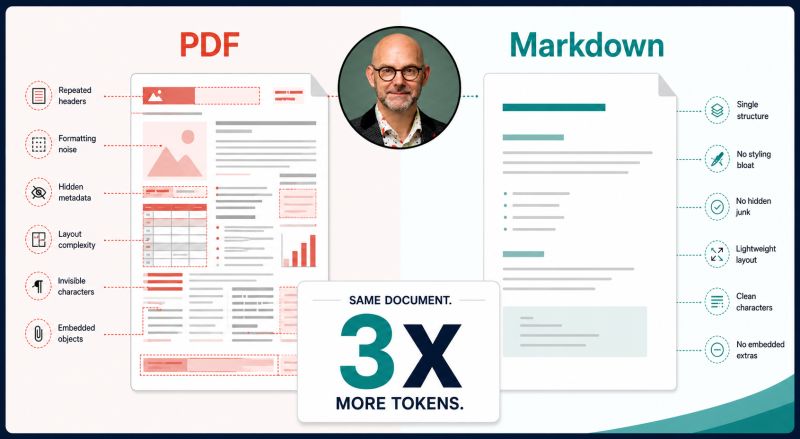
Here's the issue. When you upload a PDF to ChatGPT, Claude or Gemini, the tool doesn't read it the way you do. It extracts the text, along with everything else baked into the file: font metadata, layout coordinates, repeated headers and footers from every page, column-break artefacts, encoding overhead. None of that helps the AI understand your document. But it all gets counted, and on paid plans, that counting costs you.
A typical PDF uses around three times more tokens than the same content saved as a Markdown file. Tokens are the units that determine how much the AI can process in one go, and on API or business plans, you pay for every one of them. On a long document, that's the difference between the AI seeing everything and the AI running out of room before it reaches the parts that matter.
Markdown is plain text with simple structure. A hash symbol for a heading. A hyphen for a bullet point. No invisible metadata. No print formatting. Just the content, cleanly laid out in a way that AI models read efficiently and accurately.
If you're regularly feeding documents into AI tools, converting them to Markdown first is one of the most practical improvements you can make. Tools like Pandoc, or a simple paste into a Markdown editor, take about a minute. Free online converters take less.
The AI gets better input. You get better output. And you stop paying for font tables.
This link https://thoughtprovoked.co.uk/guides/stop-uploading-pdfs is a longer guide on how to do this.
Frequently asked questions
Why does uploading PDFs to AI tools cost more money?
Uploading PDFs costs more because AI tools extract extra hidden data alongside your text. This includes font metadata, layout coordinates, column breaks, and repeating headers or footers. A typical PDF uses around three times more tokens than a Markdown file, making you pay for unnecessary metadata on API or business plans.
How does converting a PDF to Markdown improve AI performance?
Markdown is plain text with simple formatting, such as hash symbols for headings and hyphens for bullet points. Because it strips away invisible print layout data, the document uses far fewer tokens. This prevents the AI from running out of context room on longer documents, leading to better model input and more accurate output.
How much more token efficient is Markdown compared to PDF?
A typical PDF file uses around three times as many tokens as the exact same content saved in Markdown format. By converting documents to Markdown, you remove overhead like font tables and encoding artefacts, ensuring the AI focuses purely on your text without consuming unnecessary token allowance on paid plans.
What tools can I use to convert PDFs to Markdown?
You can convert your PDFs to Markdown in about a minute using tools like Pandoc or free online converters. Alternatively, you can simply paste your text into a Markdown editor and apply basic formatting. These quick methods clean up your documents so AI tools can read them efficiently without extra processing costs.
What extra hidden data do PDFs contain that AI models extract?
When you upload a PDF, AI models extract not just the text but also font metadata, layout coordinates, repeated headers and footers from every page, column break artefacts, and encoding overhead. None of this extraneous data helps the AI understand your document, but it still counts towards your paid token limits.
You may also be interested in
Should Your IT Support Company Block the Claude AI Microsoft 365 Connector?
Why do IT support companies keep blocking the Claude AI Microsoft 365 connector over data security fears? Here's what it actually accesses, why some MSPs default to no, and how to make a governed decision instead.
Five things every business should do before deploying an AI agent
Building AI agents and workflows? Here are five things every business should do before deploying, drawn from the world's first AI governance standard.
Never miss an article
Get new articles by email
Whenever I publish something new on AI, cybersecurity and cyber resilience, I'll send you a link. No newsletters, no selling, and one click to stop at any time.
Your address is used only to send you new articles. See the privacy notice.