
Should Your IT Support Company Block the Claude AI Microsoft 365 Connector?

Why do IT support companies keep blocking the Claude AI Microsoft 365 connector over data security fears?
It's one of the questions I frequently get asked when I'm speaking on AI, whether it's a boardroom, a CEO group or a conference stage.
I don't think the right answer is either "just turn it on" or "keep it blocked forever." The right answer is to understand what the connector actually does, then make a governed decision rather than a fearful one.
What the connector actually does
The Claude Microsoft 365 connector lets Claude search and analyse content across Outlook, SharePoint, OneDrive and Teams. That sounds alarming until you look at how it works. It uses delegated permissions, which means Claude acts as the signed in user and can only see what that person already has access to. It doesn't get its own set of keys to the building, it just gets to look through the same door the employee already walks through every day.
Access is also read only. Claude can search, summarise and analyse, but it can't create, edit or delete anything in your tenant. And it doesn't cache or store the content it reads. Every request is processed and then discarded, so your documents and emails stay where they are.
On top of that, every single call Claude makes to Microsoft's Graph API is logged in your normal Microsoft 365 audit log, alongside separate authentication and usage logs on Anthropic's side. If your compliance team ever needs to know exactly what was accessed and when, that trail already exists.
Why the caution is still reasonable
None of that means your IT support company was wrong to pause. A large language model that can synthesise information across your entire mailbox and file estate is a genuinely different kind of tool from a single-purpose SaaS app, even if the permission model looks similar on paper. The real risk usually isn't a hacker breaking in. It's governance. Who gets access, how it's scoped, and whether anyone is watching what happens after it's switched on.
For a UK business, there are a few extra questions worth asking before you flip the switch. Has your organisation actually opted in to have Anthropic's models available through your Microsoft tenant, since this isn't always on by default. Has anyone reviewed Anthropic's Data Processing Addendum against UK GDPR rather than assuming EU GDPR covers it. Do you know where the data is processed and whether that satisfies your obligations on international transfers. These aren't reasons to say no. They're reasons to say "check first."
Why some IT support companies default to no
Here's the part I don't think gets said often enough. A lot of general IT support companies simply don't have the depth of knowledge in AI and security to make an informed call either way, so the safest thing for them to say is no. That's not a criticism of their intentions, it's an honest description of where most MSPs are right now. AI security is a fast moving, specialist field, and knowing the difference between delegated and application permissions, or what a DPIA should actually cover for an AI tool, isn't something every support desk has had reason to learn yet.
Saying no by default isn't governance, it's an absence of it. Real governance means understanding the tool well enough to scope it properly, not blocking it because nobody's had time to read the documentation. That's precisely why AI security is becoming a specialism in its own right, not just a bolt-on to general IT support. It's why we built that depth into ramsac and why clients increasingly come to us specifically for AI governance advice rather than assuming their existing support desk has already worked it out.
The practical path
If I were advising a client on this, I'd suggest a scoped pilot rather than an all-or-nothing decision. Enable the connector for a handful of users through Assignment Required in Microsoft Entra. Block user self-consent everywhere else, so nobody can quietly turn it on themselves. Watch the sign-in logs and Graph API activity for a few weeks. Then decide on wider rollout with actual evidence rather than a guess.
It's also worth remembering that this is reversible at any point. An admin can disable the whole connector organisation-wide, or revoke specific permissions in Entra, without anyone losing existing work.
The real point
The most interesting part of this question isn't the technical detail. It's that people keep asking it, which tells me organisations genuinely want to do this properly rather than recklessly. A lot of businesses are letting staff use AI tools on personal accounts with no visibility whatsoever, which is a far bigger risk than a properly governed connector with an audit trail. Pausing to ask "what exactly does this access, and how do we control it" is the right instinct.
The mistake is letting that caution calcify into a permanent no, without anyone ever actually reading the permission scopes or the security documentation. Good governance means understanding new tools well enough to use them safely, not avoiding them indefinitely because nobody's built the expertise yet.
If your IT support company is blocking an AI connector right now, the useful move isn't to override them. It's to ask whether they've genuinely assessed the risk, or whether "no" was simply the safest answer they could give without deeper AI security knowledge. That's usually the moment a specialist conversation is worth having.
Frequently asked questions
How does the Claude AI Microsoft 365 connector access business data?
The connector uses delegated permissions, meaning Claude acts as the signed in user and can only view content that specific employee already has access to. It operates on a read only basis across Outlook, SharePoint, OneDrive, and Teams. Claude does not edit, delete, cache, or store your content, every request is processed and immediately discarded.
Why do IT support companies block the Claude AI connector by default?
Many general IT support companies lack deep specialist knowledge in AI security and governance. Saying no by default is often the safest option for an IT helpdesk that has not yet evaluated AI permissions, DPIAs, or UK GDPR compliance. It is usually an absence of governance rather than a calculated security decision based on full documentation.
Can administrators track what data Claude accesses in Microsoft 365?
Yes, every single call Claude makes to Microsoft Graph API is recorded in your standard Microsoft 365 audit log. Anthropic also maintains separate authentication and usage logs on their side. If your compliance team needs to verify exactly what files or emails were accessed and when, a clear and traceable audit trail already exists for review.
How should a business safely test the Claude Microsoft 365 connector?
Rather than an all or nothing decision, organisations should run a scoped pilot. Admins can enable the connector for a small group of users via Assignment Required in Microsoft Entra while blocking user self consent everywhere else. After monitoring sign in logs and Graph API activity for a few weeks, leadership can make an evidence based decision.
Is enabling the Claude AI Microsoft 365 connector permanent?
No, enabling the connector is entirely reversible at any time. System administrators can easily disable the entire connector organisation wide or revoke specific user permissions within Microsoft Entra. Taking these control measures will not cause any employees to lose their existing work or documents, making a trial low risk from a technical standpoint.
You may also be interested in
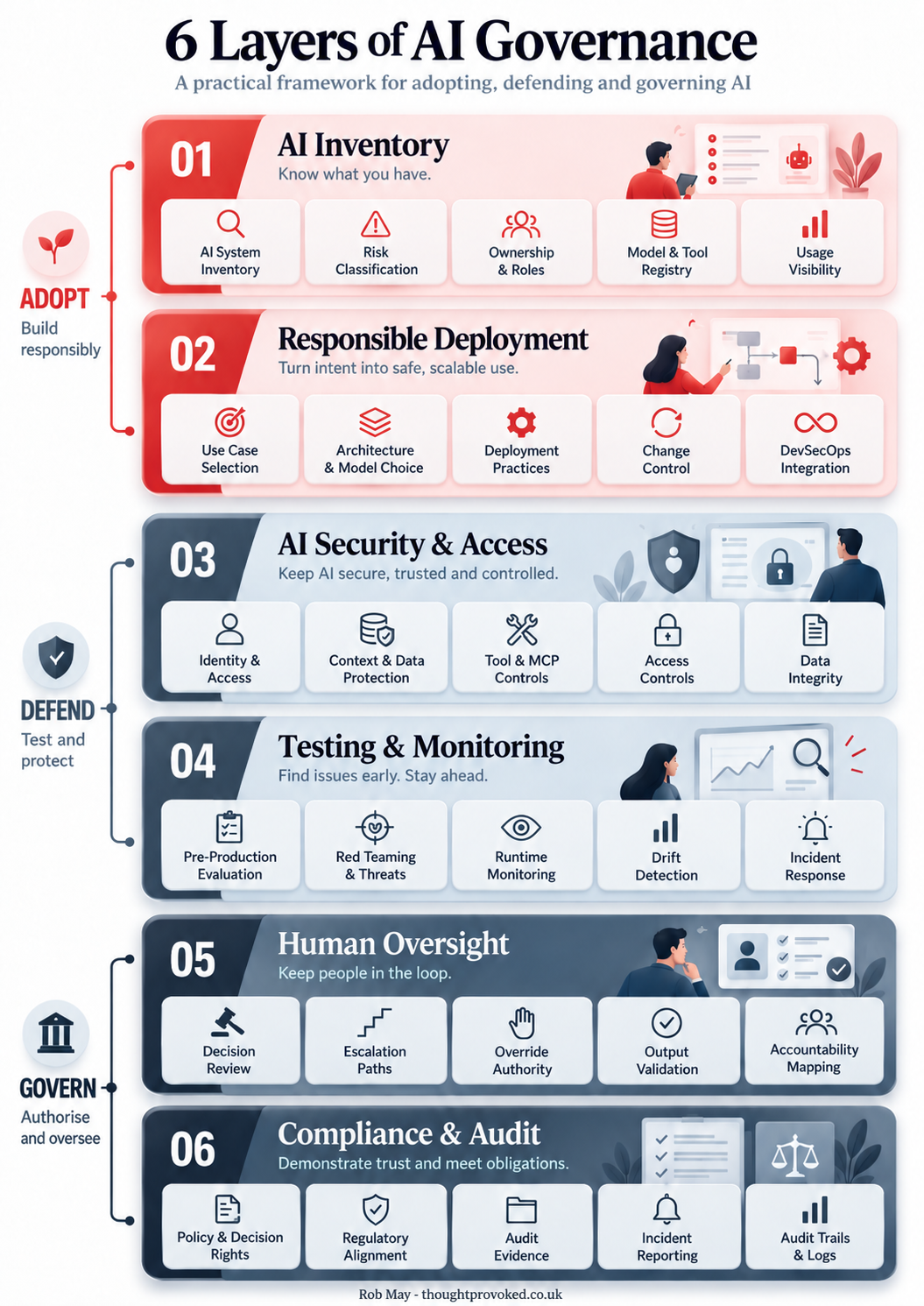
Six Layers of AI Governance: A Framework for Getting It Right
AI governance doesn't have to mean slowing everything down. This practical six-layer framework covers everything from AI inventory and responsible deployment through to human oversight and compliance, giving you a clear map of where your organisation stands and where the gaps are.
Five things every business should do before deploying an AI agent
Building AI agents and workflows? Here are five things every business should do before deploying, drawn from the world's first AI governance standard.
Never miss an article
Get new articles by email
Whenever I publish something new on AI, cybersecurity and cyber resilience, I'll send you a link. No newsletters, no selling, and one click to stop at any time.
Your address is used only to send you new articles. See the privacy notice.