
What Is Microsoft Fabric, and Why Does It Matter for AI?
Ask most leaders where their data lives and you’ll get a slightly nervous look, followed by a list: the finance system, the CRM, our ERP system, a few hundred spreadsheets, and a SharePoint folder that someone built years ago and nobody dares touch. That list is the real starting point for a lot of AI conversations, and it’s where Microsoft Fabric comes in.
Everyone wants Copilot and agents to do useful work, but an agent can only be as good as the data and context behind it. My view on this comes down to three moves: get your data foundations right, make AI work inside the Microsoft tools you already run, and do both at the same time rather than one after the other. Fabric holds the figures that have to be right, defined once and governed. Your AI also needs your documents and know-how, like the policy in SharePoint, the proposal in Teams or how your best people do the job.
What Fabric actually is
Microsoft Fabric is a single platform for storing, organising and analysing your business data. It brings together Power BI, which many of you already use for reports, with Microsoft’s other data tools, and it became generally available in November 2023. Before that, you’d typically stitch together separate tools, each with its own storage, security and bill. Fabric puts them on one shared foundation.
At the centre is one store for all your data, called OneLake, which Microsoft has described as the OneDrive for data. The important point is that your data doesn’t have to live in Microsoft’s world to be part of it. Fabric can reach data held in Amazon Web Services or Google Cloud as well as Microsoft’s own cloud, and it can connect to platforms such as Snowflake. So your data can stay where it is, whether that’s Microsoft, AWS or somewhere else, and still be brought together for reporting and AI without moving it first. That’s usually the first fear I hear, that you’d have to move everything before you could start, and it’s mostly unfounded. Fabric is still a Microsoft platform, and the AI and governance benefits are strongest when you’re using Microsoft’s tools, but you don’t need to be all Microsoft to benefit.
1. Get your data foundations right
The first benefit is simple tidiness. Fewer copies of the same data means fewer arguments in meetings about whose number is right.
The second is meaning. Fabric lets you write down what your business terms actually mean, in a layer Microsoft calls Fabric IQ. At its heart is something called an ontology, which is simply an agreed map of your customers, orders and products, how they relate to each other and the rules that apply, tied to your real data. You define “customer lifetime value” once, and AI uses that definition instead of guessing. Today you can do much of this in the reports and data models you already have in Power BI, with the ontology adding to it as it matures.
Microsoft announced Fabric IQ as ready for general use in June 2026, but not every part is. The ontology is still being tested, and Microsoft’s own documentation still labels it a preview. My advice is to use your existing definitions in real work now, and treat the ontology as a pilot: one area of the business, expect change, and don’t build everything on it yet. Gartner’s first take on the latest updates gives similar advice, to adopt it step by step.
Foundations also means making your data readable to AI. Microsoft’s own guidance for getting Power BI ready for Copilot is refreshingly basic: clear names, helpful descriptions, no duplicates and a simple structure. None of this is glamorous, and it’s the bit most people want to skip. But if two people in your business would define “active customer” differently, no platform will fix that for you.
2. Make AI work inside your Microsoft estate
By estate I mean the Microsoft tools you already run, such as Microsoft 365, Teams and SharePoint. If that’s you, you have a head start, because Fabric extends Copilot to your business figures. Copilot in Fabric has been included on every paid tier since April 2025, rather than only the largest ones.
You can also build what Microsoft calls a data agent, an AI assistant that answers questions straight from your governed figures, such as “what were sales by region last quarter?”, and respects who’s allowed to see what. These agents now plug into Microsoft’s agent builder, Copilot Studio, and can be published into Teams and Microsoft 365 Copilot. People get answers in the tools they already use every day, rather than in yet another dashboard. Microsoft made this generally available in September 2026, so it’s no longer a preview experiment.
Governance is the reason to stay inside the Microsoft tools. Fabric uses Microsoft Purview, Microsoft’s data protection and compliance toolset, to label sensitive data, stop it leaking and keep an audit trail. It extends to Copilots and agents too, so you can see what AI was asked and what it answered. That means one set of rules and permissions, instead of a new tool with its own idea of who can see what. That’s govern what matters, don’t slow what works, in practice. Some of the Purview features cost extra, so check what your licence includes.
3. Run two tracks at once
This is where I’d push hardest. You cannot afford a twelve month Fabric build while your AI work sits idle waiting for it. A year spent waiting for perfect data is a year of habits, skills and governance you haven’t built.
So run two tracks side by side. On the first, build out your Fabric estate in stages, starting with the data the business leans on most. On the second, start getting AI to value now with what you already have: Copilot on your Microsoft 365 content, a first agent on a dataset that’s clean enough, and a handful of practical use cases that people actually adopt.
Here’s a simple test for deciding what belongs in Fabric. For each AI idea, ask whether it needs a figure that has to be right or knowledge that has to be found. Put the figures into Fabric, one agreed definition at a time. Your AI can use documents and know-how where they already sit. Plenty of good ideas need both.
The two tracks feed each other. Early AI use cases tell you which data to fix first, and a stronger foundation makes every later agent more reliable. You learn how to use AI, how to govern it and where it breaks, while the platform underneath gets better.
A reality check
Fabric isn’t magic, and the groundwork still has to be done by people. On cost, for a smaller business the capacity is often the smaller part. Fabric is priced by capacity, which is simply the amount of computing power you reserve, rather than per user. The smallest size, called an F2, is roughly £200 a month on pay as you go, and committing for a year or more saves around 41%. Agreeing definitions and moving data take most of the time and money, so move only the data that needs governing.
A few other costs are worth knowing about. Storage is billed separately, Copilot use draws on the same capacity, and on the smaller sizes people who view shared Power BI reports also need a Power BI Pro licence. Putting a data agent into Microsoft 365 Copilot or Copilot Studio brings that product’s licensing too. Model it all before you commit. And if you’ve already invested in other data platforms, such as Snowflake or Azure Databricks, you don’t have to start again. Fabric can connect to both, so move only where it genuinely makes sense.
Where to start
Pick one question your business asks every month and struggles to answer quickly, like “which customers are most profitable?” Trace where the data behind it lives, who owns it and whether two people would define the key terms the same way. That’s your first piece of foundation. Then pick one AI use case you can start this month, without waiting for any of it to finish. After that, let each use case decide what moves into Fabric next.
Everyone’s asking which AI model is smartest. A better question is whether your AI knows what your business means when it says “customer”, and whether you’re teaching it that while you’re already putting AI to work.
Further reading
-
Fabric Data Agents in Microsoft Copilot Studio (Generally Available), Microsoft Fabric Updates blog: the announcement of the integration and how to publish to Teams and Microsoft 365 Copilot. https://community.fabric.microsoft.com/blog/fbc_fabricupdatesblogs/fabric-data-agents-in-microsoft-copilot-studio-generally-available/5362882
-
Fabric IQ: The shared context layer for AI agents and real-time applications, Microsoft Fabric Updates blog: Microsoft’s Build announcement, setting out what’s generally available and what’s still in preview. https://community.fabric.microsoft.com/blog/fbc_fabricupdatesblogs/fabric-iq-the-shared-context-layer-for-ai-agents-and-real-time-applications/5191678
-
Copilot in Power BI tutorial: Prepare semantic model for AI, Microsoft Learn: practical steps for making your models readable to Copilot. https://learn.microsoft.com/en-us/power-bi/create-reports/tutorial-copilot-power-bi-prepare-model
-
Governance overview and guidance, Microsoft Learn: Microsoft’s own overview of how Fabric governance works, including what needs extra Purview licensing. https://learn.microsoft.com/en-us/fabric/governance/governance-compliance-overview
For your IT team
A short reference for whoever will act on this, with the detail kept out of the main article for ease of reading.
-
Shortcuts: these behave like symbolic links, so data in Amazon S3, Google Cloud Storage or Azure Data Lake Storage appears in OneLake without being copied.
-
Mirroring: this continuously replicates databases such as Azure SQL, Cosmos DB and Snowflake into OneLake. For Azure Databricks, only the catalogue is mirrored and the data stays where it is.
-
Fabric IQ status by component: Graph, operations agents and data agent MCP support are generally available. The ontology and the wider integrations across Foundry, Copilot Studio and GitHub Copilot are in preview. Microsoft Learn still labels both the ontology and the IQ workload as preview, as of October 2026, even though Microsoft announced Fabric IQ as generally available at Build.
-
Preparing models for Copilot: Microsoft’s guidance covers field descriptions, hiding unnecessary columns, avoiding duplicate field names and star schema design. Its newer Prep data for AI features, such as AI instructions and an AI data schema, are still in preview.
-
Data agents: these are generally available and respect the access restrictions set on the lakehouses and warehouses they query. They plug into Copilot Studio as a tool and can be used from Foundry and Microsoft 365 Copilot. Purview governance policies still apply to the underlying data when they’re accessed through Microsoft 365 Copilot. Some older documentation still shows the preview label for the Copilot Studio integration, so build on the current tool route.
-
Purview: Fabric uses it for sensitivity labels, data loss prevention and audit, and it provides governance controls for Fabric Copilots and agents, including audit coverage and retention for AI interactions. Some capabilities need additional Purview licensing.
-
Licensing: Fabric is billed by capacity (F SKUs) rather than per user. Copilot has been available on all paid SKUs from F2 upwards since April 2025. OneLake storage is billed separately, Copilot use is billed to the same capacity, and below F64 viewers of shared Power BI content need Pro licences.
Frequently asked questions
What is Microsoft Fabric and how does it manage business data?
Microsoft Fabric is a unified platform for storing, organising, and analysing data, bringing together Power BI and other analytics tools. At its core is OneLake, a central store that connects to data across Microsoft Cloud, AWS, Google Cloud, and Snowflake, allowing businesses to analyse data without moving it first.
Do you have to move all your data to Microsoft Cloud to use Fabric?
No, you do not need to move all your data. Fabric uses shortcuts and mirroring to connect directly to external sources like Amazon Web Services, Google Cloud, and Snowflake. This allows your data to stay where it currently lives while still being brought together for reporting and AI tools.
What are Fabric data agents and where can employees use them?
Fabric data agents are AI assistants that answer business questions directly from your governed figures while respecting existing security permissions. They connect to Microsoft Copilot Studio and can be published straight into Microsoft Teams and Microsoft 365 Copilot, letting staff get answers within the tools they already use daily.
How does Microsoft Fabric keep business data secure when using AI?
Fabric uses Microsoft Purview to handle data protection and compliance. It applies sensitivity labels, prevents data leaks, and maintains audit trails across your datasets. Purview extends to Copilots and data agents, ensuring consistent access rules and recording what AI was asked and how it responded.
How is Microsoft Fabric priced and licensed?
Fabric is priced by computing capacity using F SKUs rather than per user. The entry level F2 capacity costs roughly £200 a month on pay as you go. Storage is billed separately, and for capacities below F64, users viewing shared Power BI reports will still require individual Power BI Pro licences.
You may also be interested in
Your Biggest AI Security Risk May Be the Agent Nobody Told You About
Approved doesn’t mean safe. AI agents can now act for your business, not just answer questions. Here are the four types to know and five controls to govern them, including the ones nobody told you about.
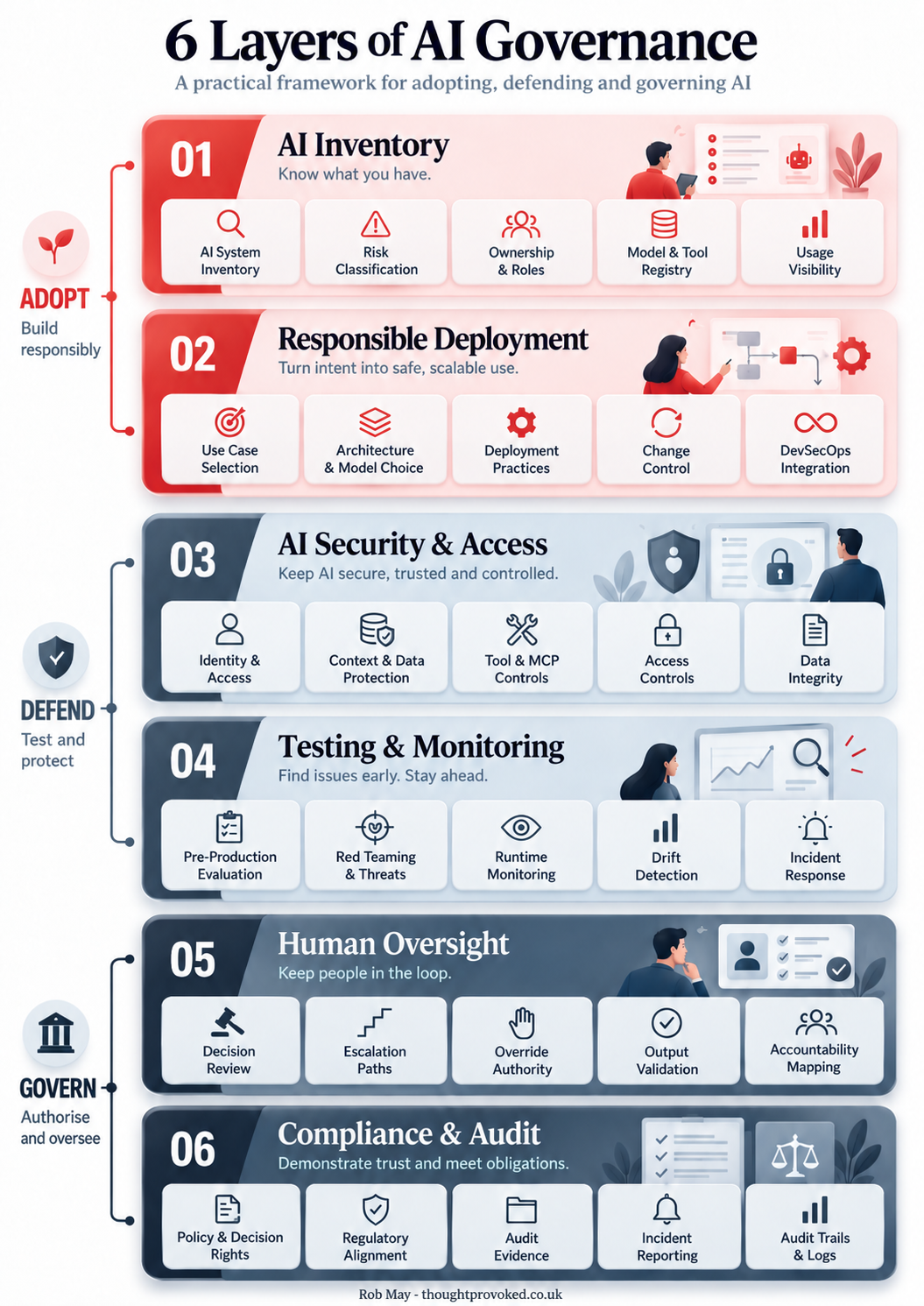
Six Layers of AI Governance: A Framework for Getting It Right
AI governance doesn't have to mean slowing everything down. This practical six-layer framework covers everything from AI inventory and responsible deployment through to human oversight and compliance, giving you a clear map of where your organisation stands and where the gaps are.
Never miss an article
Get new articles by email
Whenever I publish something new on AI, cybersecurity and cyber resilience, I'll send you a link. No newsletters, no selling, and one click to stop at any time.
Your address is used only to send you new articles. See the privacy notice.