
Your Biggest AI Security Risk May Be the Agent Nobody Told You About
Most security conversations about AI still start with a chatbot and a question about whether staff should be allowed to use it. That question is already way out of date.
AI is moving from answering questions to doing work. An agent can read internal documents, call APIs, pull customer information, trigger workflows and, in some set-ups, change production systems. That’s a different kind of risk from someone pasting a paragraph into a chat window, and it needs a different kind of governance.
Not all AI agents are the same
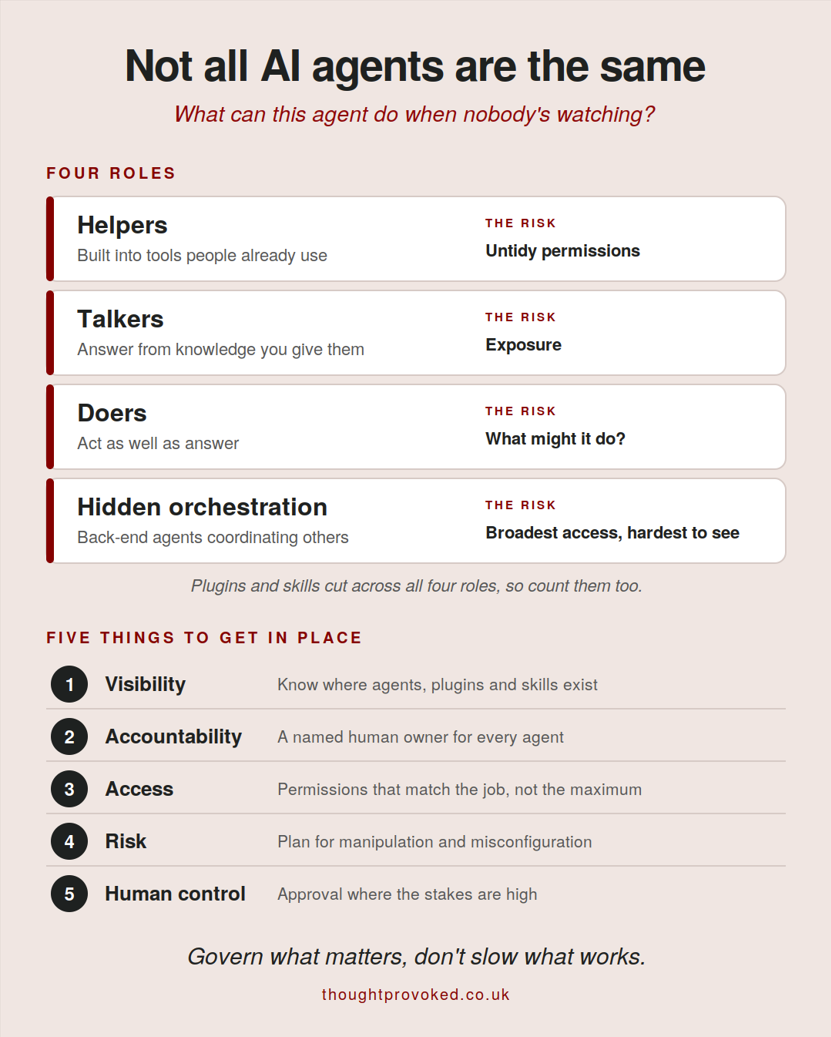
When I explain AI agents to business leaders, I use four simple roles, because the security question changes depending on which one you’re dealing with. The framework started with Microsoft Copilot, but it works with any vendor.
Helpers are AI features built into the tools people already use, like Copilot in Outlook or Gemini in Google Workspace. They work with whatever that person can already access, so the risk is untidy permissions. If staff can see files they shouldn’t, a helper will find them very efficiently.
Talkers answer questions using knowledge you’ve given them, such as a website chatbot or an internal assistant that handles HR queries. The risk is exposure. What can it see, and could it share something with the wrong person?
Doers act as well as answer. That could be a Copilot Studio agent or a Zapier automation with an AI step in the middle, and a motivated employee can build one in an afternoon. The risk moves from “what might it say?” to “what might it do?”
Hidden orchestration is the back-end layer, built by developers on platforms like Azure or AWS, that coordinates other agents and systems. It’s the hardest to see and often holds the broadest access.
Most businesses have thought about helpers, and some about talkers. The governance gap usually sits with the doers and the hidden layer.
Plugins and skills cut across all four roles. They’re the add-ons that give an agent new abilities, such as connecting to your CRM, following a set of instructions or running a workflow. OpenAI is replacing custom GPTs with plugins, and skills do a similar job in other platforms. The security point is that an add-on can quietly turn a talker into a doer. Treat them like any software install, and know who built them, what they connect to and who approved them.
Approved doesn’t mean safe
“Is this tool approved or in our AI policy?” is the wrong place to stop. A tool can be approved and still hold far more access than its job needs. Worse, plenty of agents never go through approval at all. Nobody’s being reckless, they’re just trying to save time. But a small mistake, or an agent manipulated by instructions hidden in an email or document it was asked to read, can turn into a genuine business incident very quickly.
A better question is “what can this agent do when nobody is watching?”
Five things to get in place
Visibility. You can’t govern what you can’t see. Know where agents exist, what they’re connected to and who built them, including the ones that were never on a list, and the plugins and skills they use.
Accountability. Every agent needs a named human owner. If an agent caused an incident tomorrow, you should already know whose phone rings.
Access. Permissions should match the agent’s actual job, not its maximum capability. This is least privilege, the same principle we apply to people, and it matters even more for something that works at machine speed.
Risk. Ask what happens if the agent is misconfigured, manipulated or simply behaves in a way nobody expected. Then check whether the access it has would make that a nuisance or a disaster.
Human control. Keep a person in the loop where an action could have serious business, financial, legal or security consequences. You don’t need approval for every small step, which would just slow everything down, but you do need it for the ones that matter. Govern what matters, don’t slow what works.
I’ve pulled these four roles and the five controls into this one visual. Download it and save it before your next AI governance review or share it with your leadership team as a starting point for the conversation.
Where a good MSP helps
Visibility is the hardest of the five, because it’s the one most businesses are guessing at. This is where a good AI-focused managed service provider earns its place. At ramsac, and with other MSPs taking AI seriously, we offer shadow AI reporting tools that show which AI tools and agents are actually in use across your organisation. That means you start from what’s really happening, not from what’s on the approved list, and the governance conversation gets much more honest.
What to do next
Pick one agent in your business, ideally a doer, and answer three questions about it. Who owns it? What can it reach? and What would happen if someone manipulated it? If you can’t answer all three quickly, you’ve found your starting point.
The aim isn’t to stop people using AI. It’s to make sure AI doesn’t quietly become a member of staff with admin privileges, one nobody onboarded and nobody manages. You wouldn’t hand a new starter the keys to everything on day one and then stop asking what they were up to, so why would you do it for an agent?
Frequently asked questions
What are the main types of AI agents and their security risks?
The four main roles of AI agents are helpers, talkers, doers, and hidden orchestration. Helpers risk exposing files through untidy permissions, while talkers risk exposing sensitive information. Doers carry operational risks because they can perform actions, and hidden backend orchestration layers often hold the broadest system access of all.
How can an AI plugin or skill create a security hazard?
Plugins and skills are add-ons that grant agents new capabilities, such as connecting to CRMs or running automated workflows. The primary security risk is that an add-on can quietly convert a simple talker agent into an active doer agent. Businesses should treat plugins like software installations and control who approves them.
Why is an approved AI tool not automatically secure?
An approved AI tool can still hold far more access privileges than its specific job requires. Furthermore, agents can be manipulated by hidden instructions within emails or documents they read. Governance must look beyond simple approval to evaluate what an agent can actually do when nobody is watching.
What five controls should organisations put in place for AI agent governance?
Organisations need visibility to track all agents and skills, along with named human accountability for every agent. Access must follow the principle of least privilege, matching actual job needs. Businesses should also evaluate potential risks from unexpected behaviour and maintain human control for actions with serious business consequences.
How can a managed service provider help with AI visibility?
Visibility is often the hardest control to establish because many employees create agents without formal approval. A managed service provider, such as ramsac, can deploy shadow AI reporting tools to reveal which AI tools and agents are actually in use, establishing an honest foundation for organizational AI governance.
You may also be interested in
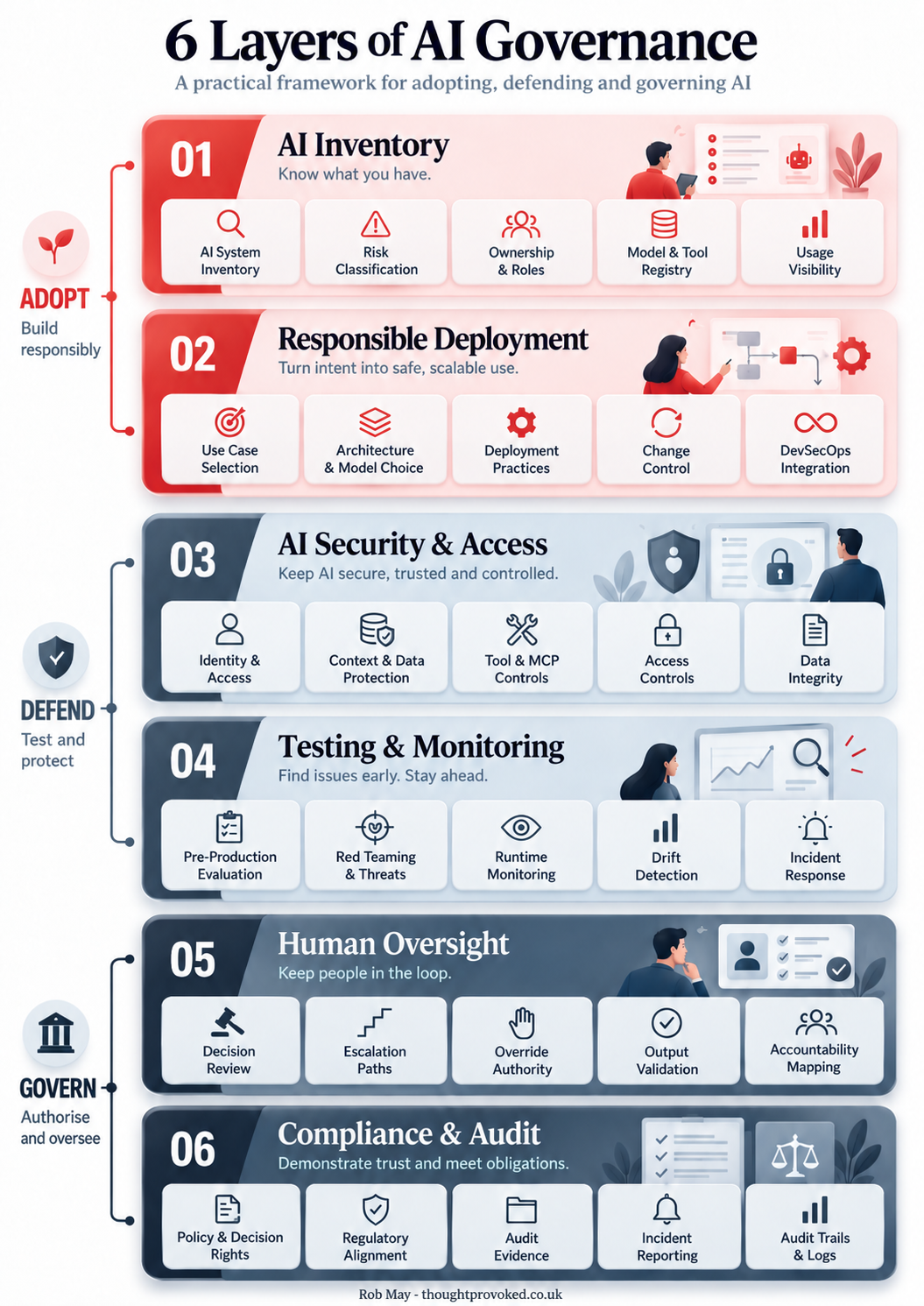
Six Layers of AI Governance: A Framework for Getting It Right
AI governance doesn't have to mean slowing everything down. This practical six-layer framework covers everything from AI inventory and responsible deployment through to human oversight and compliance, giving you a clear map of where your organisation stands and where the gaps are.
Policy Didn't Stop These Breaches. Judgement Would Have.
Why charity AI policies aren't preventing data breaches. Real cases, the 20:60:20 rule for safe AI use, and what trustees now need to know about AI governance.
Never miss an article
Get new articles by email
Whenever I publish something new on AI, cybersecurity and cyber resilience, I'll send you a link. No newsletters, no selling, and one click to stop at any time.
Your address is used only to send you new articles. See the privacy notice.